
This page is a translation of the Japanese page. Inquiries and support are handled in Japanese. The admin console is available in Japanese only; the employee app supports 日本語, English, Tiếng Việt, 中文(简体), 中文(繁體), 한국어 and नेपाली.

Tickwork Quotes & Invoicing

From quote to payment, in one flow

Approve business documents and send them as PDF, then confirm payment and move on to accounting.

Internal chat included (with calls, announcements and schedules)The first three steps and pricing
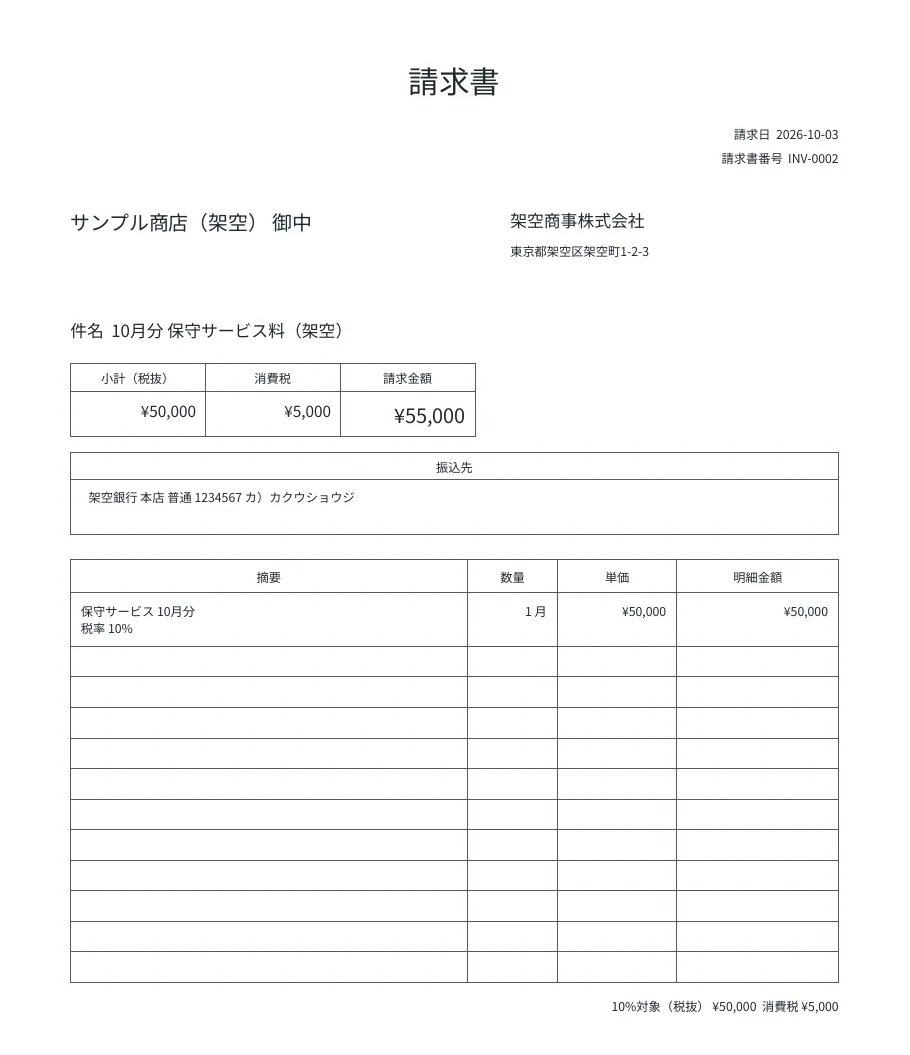
Example of an invoice PDF issued with Tickwork (fictional customer)
Approved documents as PDF

Note: Screens are for illustration purposes only (the companies and customers are fictional).

The first three steps

After you apply, you can start using the service with these three steps, without any other setup.

  1. Enter a customerYou can start with just the company name.
  2. Create a quotation or invoiceEnter the item name, quantity and unit price, and consumption tax and totals are calculated.
  3. Issue as PDFThe business document is ready to send as it is.

Tickwork Quotes & Invoicing pricing

  • Up to 10 users¥6,000/month¥6,600 incl. tax
  • 11–30 users¥12,000/month¥13,200 incl. tax
  • 31–50 users¥18,000/month¥19,800 incl. tax

Prices exclude tax. Annual payment equals 11 months of the monthly fee. If you use two or more modules, Tickwork All-in-One offers better value.

From quotation to payment confirmation, in a single workflow

  1. 1STARTQuotations during the meetingSimply select the customer and items. Output as a PDF with your company seal and logo.
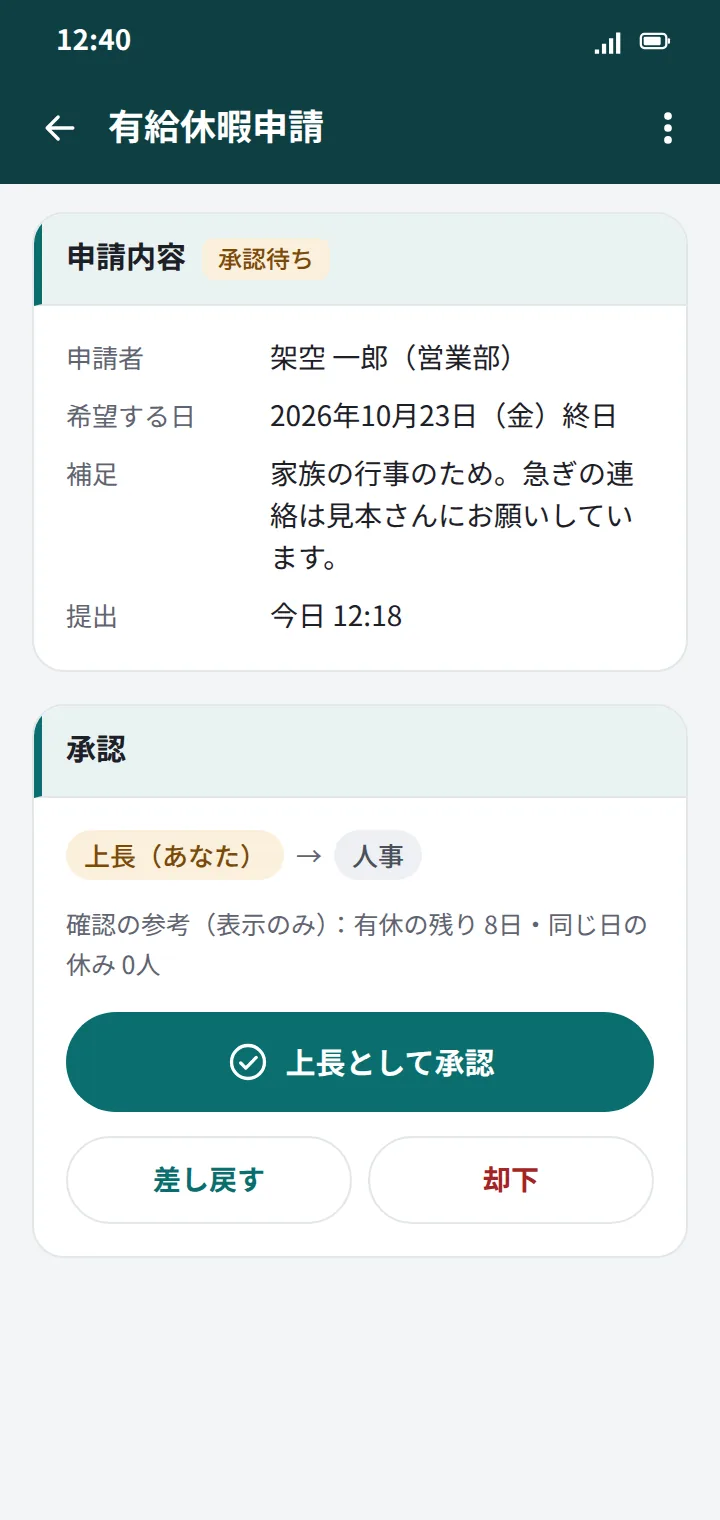
  2. 2Manager approvalA manager approves documents before they are issued, even from a smartphone.
  3. 3Send invoicesCreate an invoice from the quotation and send the PDF by email.
  4. 4Reconcile paymentsImport bank statements and match payments received against invoices.
  5. 5Outstanding amounts at a glanceExecutives can check balances and outstanding receivables by customer at any time.
GOALLess re-entry and payment matching work, and outstanding receivables visible at a glance

Keep the same line items from quote to accounting

Scroll to switch screens in sequence.

  1. Quotation

    Approve and issue quotations

    Enter from registered items or past line items, and issue as PDF after approval.

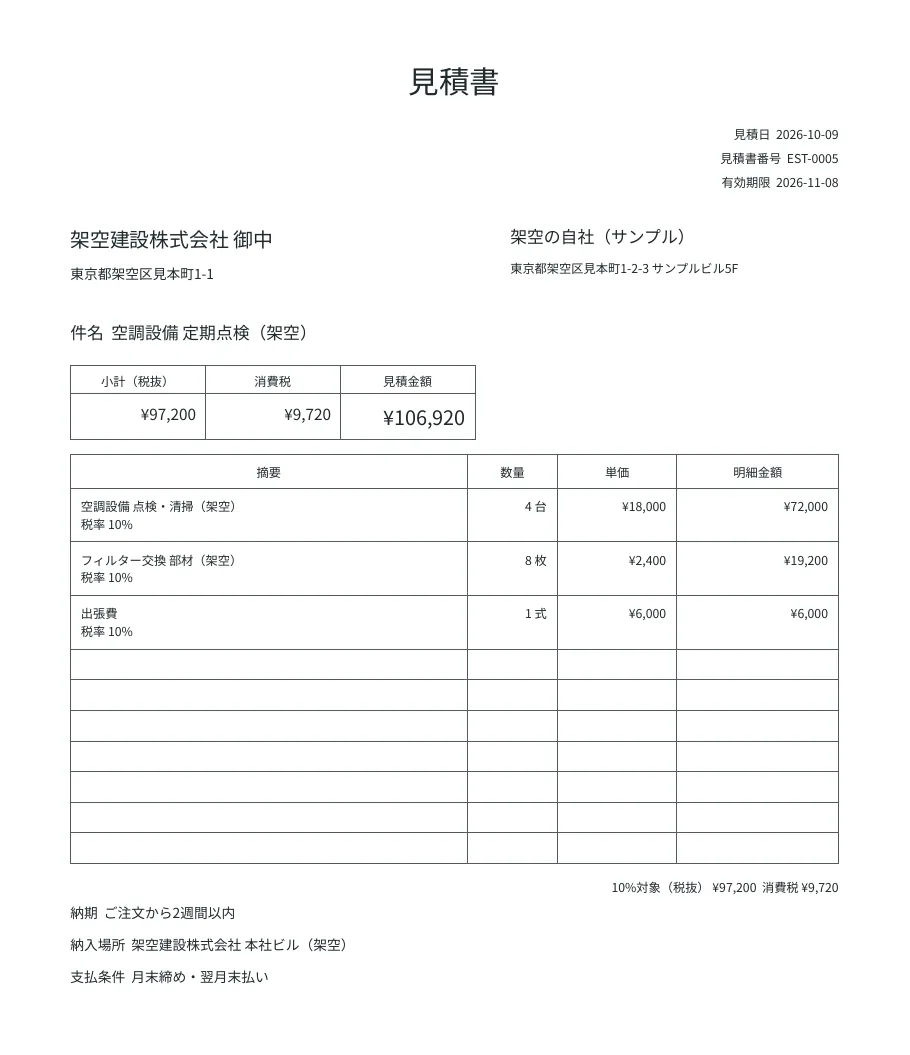
    Quotation PDF, showing the addressee customer, subject, subtotal, consumption tax, quoted amount, line items and validity period
  2. Order acceptance

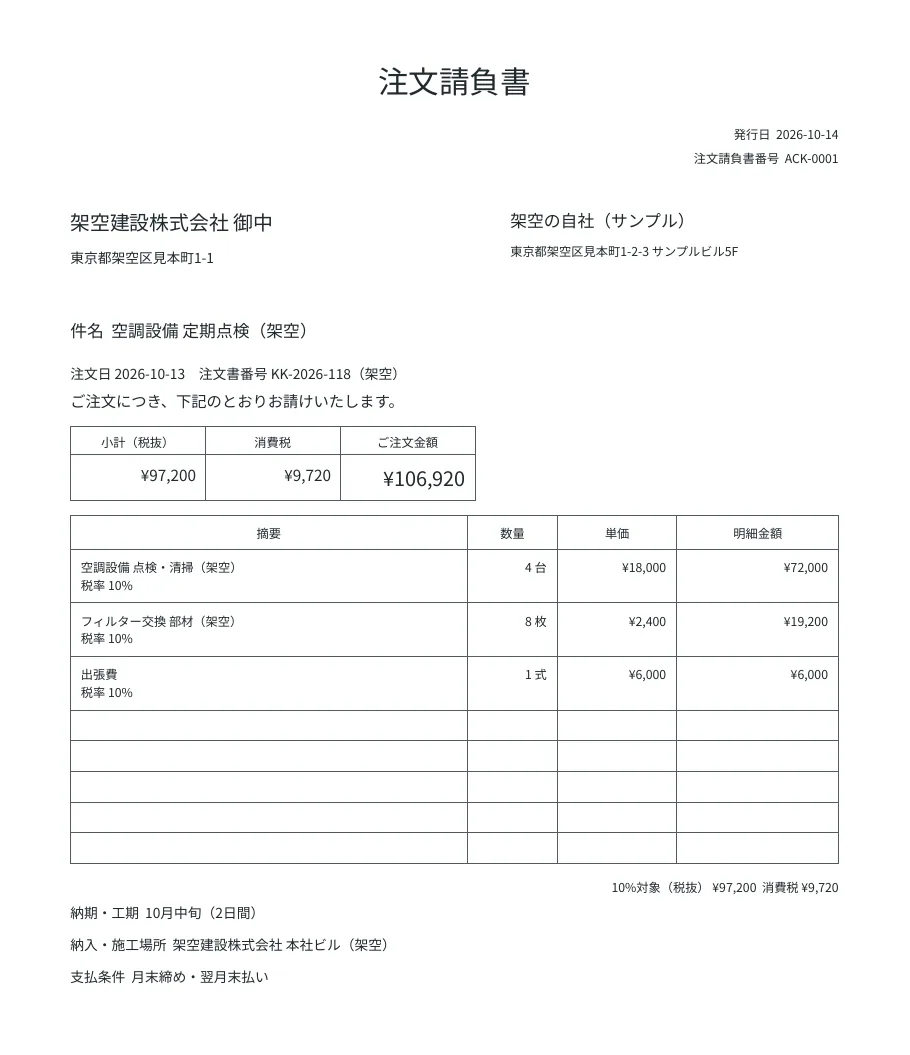
    Order acceptance when you receive an order

    Carries over quote line items and states delivery dates (work periods) and payment terms.

    Order acceptance PDF, showing the order date and purchase order number, line items and totals, delivery date, construction period and payment terms
  3. Delivery

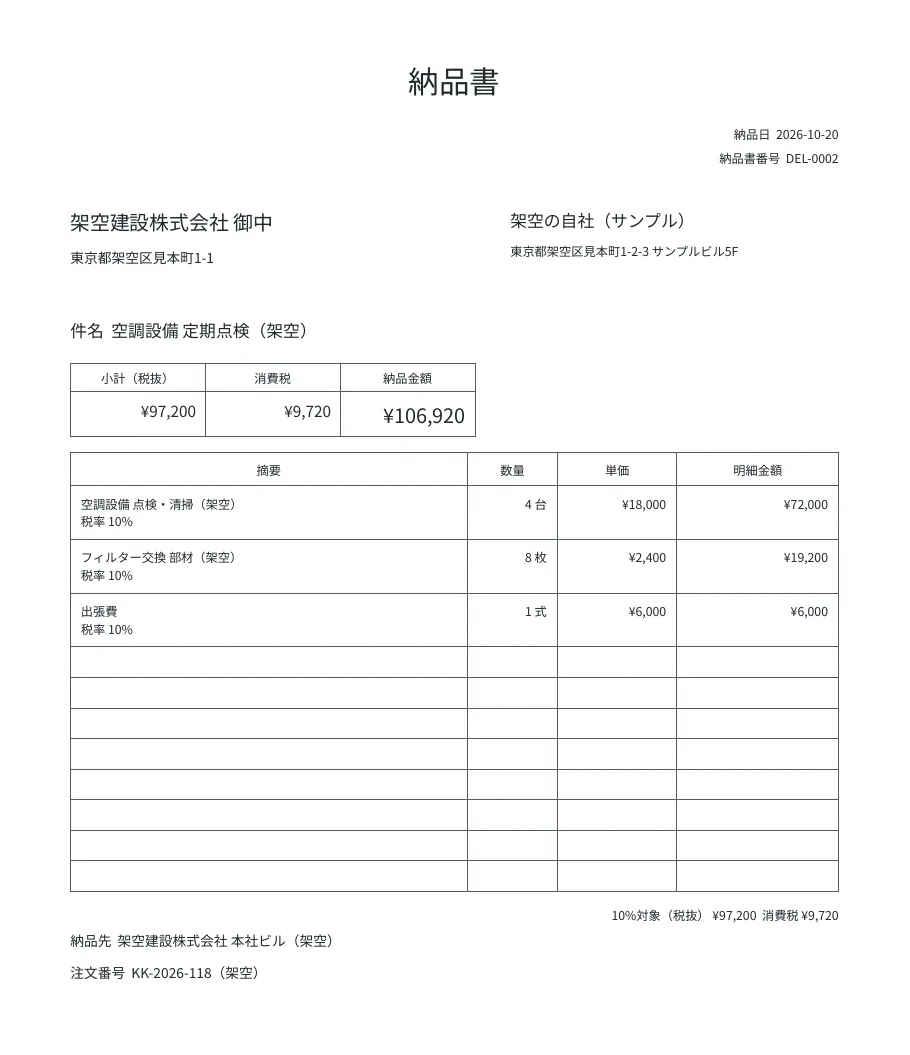
    Delivery note when the work is complete

    Issued with the same line items. Items up to the closing date can be combined into one invoice.

    Delivery note PDF, showing line items, totals and the delivery destination
  4. Invoice

    Payment due dates filled in automatically

    Calculated from each customer's closing date and payment terms, with a breakdown by tax rate printed.

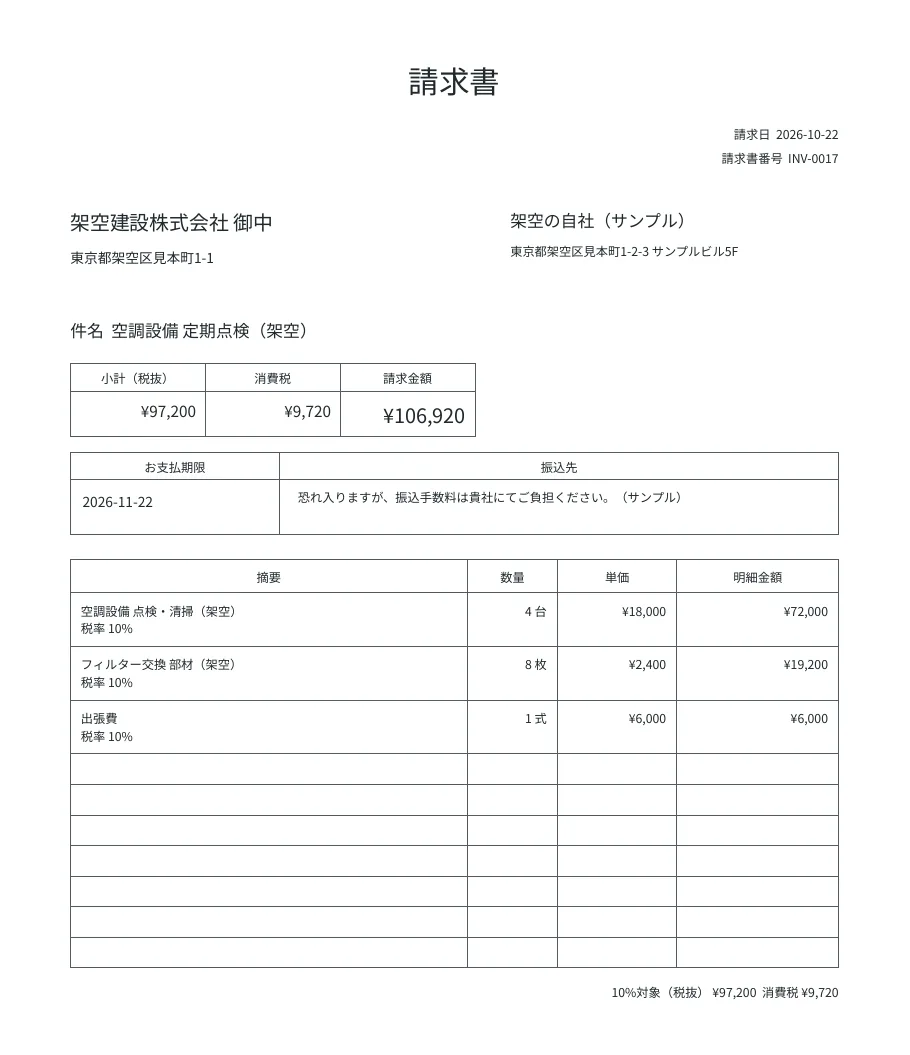
    Invoice PDF, showing line items, a breakdown by tax rate, the payment due date and bank details
  5. Storage and sending

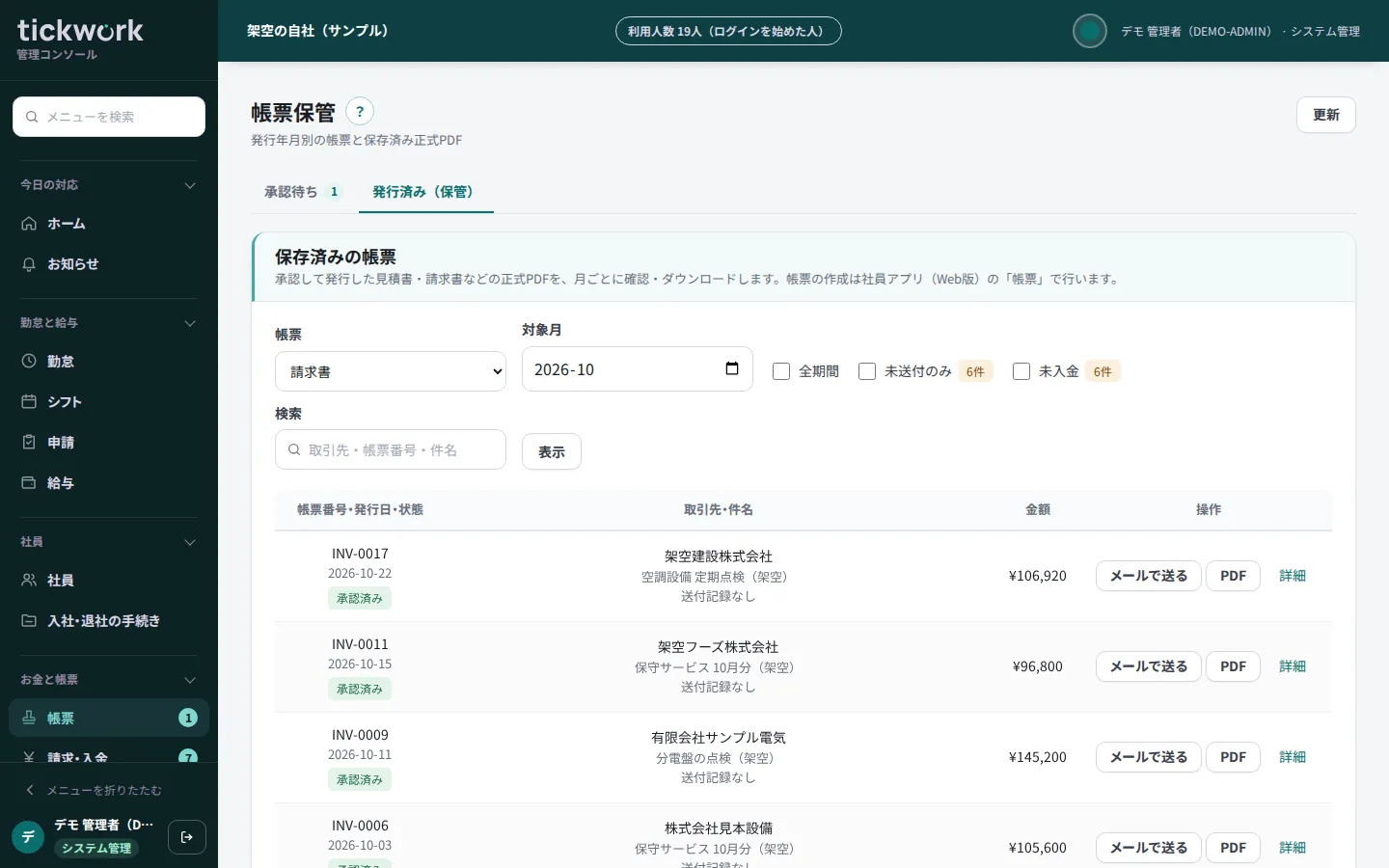
    Store and send issued business documents

    Stored by month and sent from the person in charge's email address.

    Business document storage in the admin console, showing documents by month of issue with buttons to view, download, reissue and email the saved PDF
  6. Payment

    Payment matching and accounts receivable review

    Finds invoices whose amount and transfer name match bank statement entries, and records the payments.

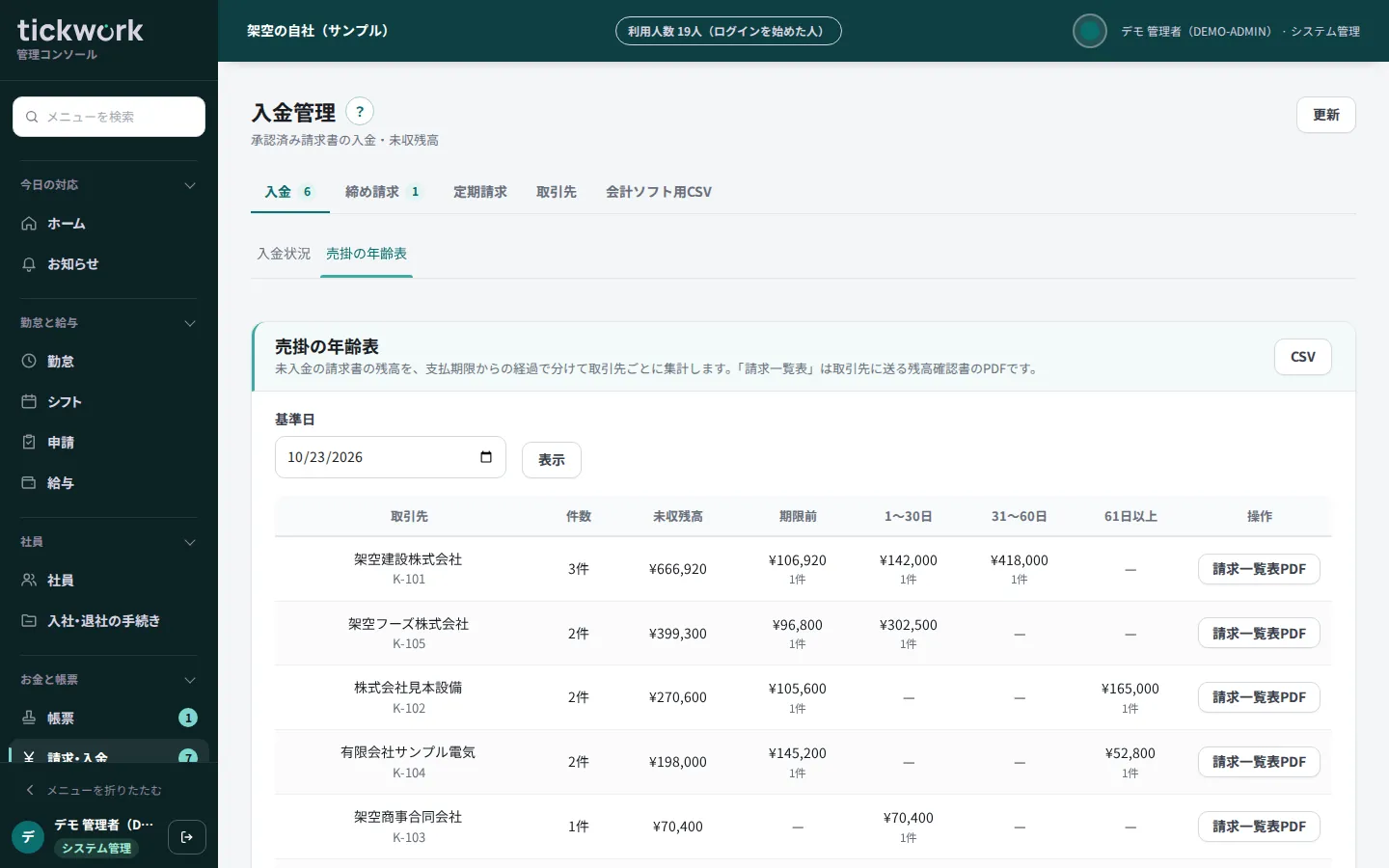
    Accounts receivable aging report in receivables management in the admin console, showing outstanding balances by customer divided into not yet due, 1–30 days, 31–60 days and 61 days or more
  7. Accounting

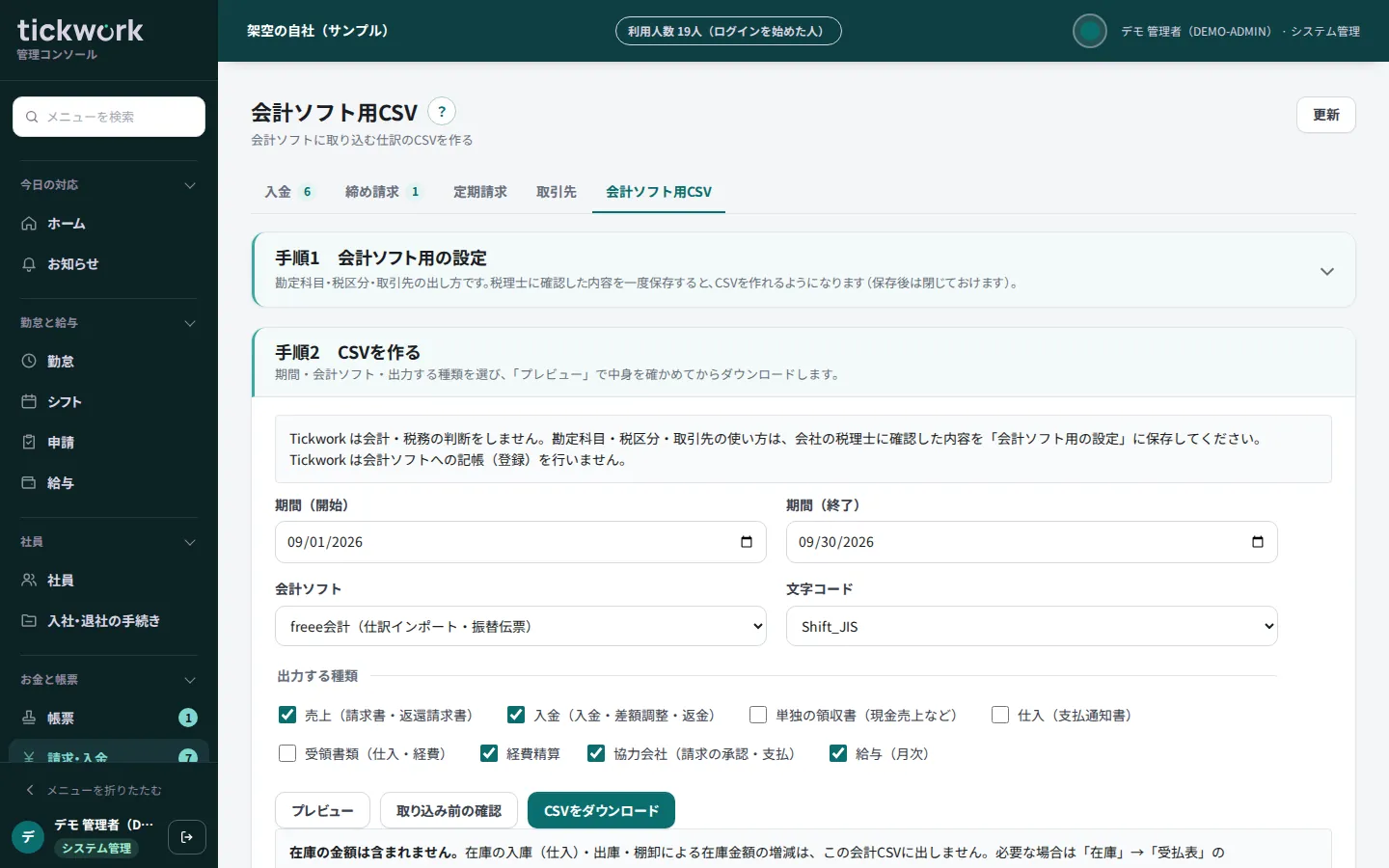
    To CSV for accounting software

    Creates journal entries that can be imported into freee Accounting, Money Forward Cloud Accounting and Yayoi Kaikei (弥生会計).

    CSV for accounting software in the admin console: select the period, accounting software, character encoding and data types, then preview

Note: Illustrative screen (fictional company and customers).

Carry the same line items over to the next document

No more transcription. Only approved documents are issued.

Air-conditioning equipment periodic inspection (fictional), Kakuu Construction Co., Ltd.

  1. Quotation
  2. Order acceptance
  3. Delivery
  4. Invoice
  5. Payment
Quotation EST-0005 has been issued

3 line items, total ¥106,920 (incl. tax). Valid for 30 days from issuance.

Note: Illustrative screen (fictional data).

Creation and issuance

Documents are issued after approval, so nothing goes out unchecked

Quote details carry over to delivery notes and invoices as is.

  • Prints "※" on reduced-rate (8%) items and a breakdown by tax rate
  • Order acceptances, purchase orders, payment notices and return invoices follow the same flow
  • Notifies the person in charge on quote follow-up dates and records win rates and loss reasons
  1. Quotation
  2. Delivery note
  3. Invoice
  4. Receipt

ApprovalIssue as PDFStorage and search

Sending, consolidated invoicing and recurring invoices

Send the invoices you create, just as they are

  • Send by email

    Sent with a PDF attached, and recorded in the customer interaction history.

  • One invoice with consolidated invoicing

    Combines delivery notes up to the closing date into one invoice per customer. Prevents double billing.

  • Recurring invoices drafted automatically

    Drafts maintenance fees, retainer fees and more on monthly, weekly or yearly cycles.

  • Find business documents quickly

    Received documents can also be searched by transaction date, amount and business partner.

Payments and accounts receivable

Match payments and spot unpaid invoices at once

Import bank statements (CSV, PDF or photo) to find matching invoices and record payments.

  • Automatic payment matching: transfer names such as "カ)カクウシヨウジ" are also matched to customers
  • Receipts are issued automatically when a payment is recorded (on/off in settings)
  • AI reads PDF and photo statements and verifies each line against the balance
  • Accounts receivable aging report and invoice list (balance confirmation) PDFs
Accounts receivable aging report in receivables management in the admin console, showing outstanding balances by customer divided into not yet due, 1–30 days, 31–60 days and 61 days or more, with an Invoice list PDF button on each row

Note: Screens are for illustration purposes only (the data shown is fictional).

CSV for accounting software

Sales and payments to accounting software

Creates journal entry CSVs from invoices, payments, expense claims and more. After the month is finalized, only changes can be exported.

  • Supports freee Accounting, Money Forward Cloud Accounting and Yayoi Kaikei (弥生会計)
CSV for accounting software in the admin console: select the period, accounting software (such as freee Accounting), character encoding and data types, preview, then download

Note: Screens are for illustration purposes only (the data shown is fictional).

Review upcoming cash inflows and outflows as projections

Available to finance, management and system administrators.

  • Cash flow forecast

    Lays out 3 to 6 months of expected receipts and payments by month or week. Flags periods where the ending balance may turn negative.

  • Tax and insurance premium payment deadlines

    Lists deadlines and estimated amounts for withholding income tax and resident tax. Notifies you as deadlines approach.

  • Matching withdrawals on bank statements

    Matches withdrawals against payment, payroll and tax payment records. A person confirms with Match (照合する).

Cash bookkeeping and financial statement analysis, made quick with AI

You can always review what the AI read before saving.

  • Cash book

    Records petty cash receipts, payments and balances. AI can read receipts.

    • Fills in the previous account title and tax category automatically
    • AI toolEnters the date, amount and registration number from receipt photos and PDFs
    • Search by fields that meet the Electronic Bookkeeping Act search requirements
  • AI tool

    Financial statement analysis

    AI reads amounts from photos and PDFs of financial statements and analyzes the figures. Manual entry is also available.

    • Supports corporate financial statements and blue-return financial statements of sole proprietors
    • Compares by industry with statistics from the SME Agency's Basic Survey of Small and Medium Enterprises
    • Only the owner and people the owner designates can view it

Note: AI fees: Financial statement analysis is free once per month, then ¥550 (incl. tax) per run. Receipt reading for the cash book is free up to 50 per month, then ¥11 (incl. tax) per page. Supplier invoice reading (Inventory & Orders) is free up to 20 per month, then ¥11 (incl. tax) per page. Bank statement reading is free up to 5 per month, then ¥55 (incl. tax) per item (1 item = 1 file, up to 30 pages). Before any charge applies, the screen asks you to confirm twice. Manual entry and non-AI indicators are always free (Pricing).

Before you use itNotes on document requirements, accounting software, cash flow and AI
  • Confirm the latest legal requirements for business document entries, such as the Qualified Invoice System, with each authority. Only the format of registration numbers is checked.
  • Set account titles and tax categories after confirming with your certified public tax accountant. Import into accounting software is done by your company. freee, Money Forward and Yayoi are trademarks or registered trademarks of their respective companies.
  • All figures in the cash flow forecast are projections. Payment deadlines are estimates based on general rules; confirm official deadlines and amounts with notices and payment slips from each authority. Tickwork does not make tax, insurance or financial decisions.
  • Financial statement analysis is not tax or accounting advice. For individual matters such as tax filing or tax savings, consult your certified public tax accountant. Also confirm with your tax accountant how to meet the Electronic Bookkeeping Act requirements.
  • For reading and analysis, images and figures are sent to an AI service provided by Google (FAQ).

Please feel free to contact us

We will ask about your number of users and the features you need, and advise you on how to proceed with implementation.

  • Free 30-day trial
  • No card required

If you would like to review materials first, please request materials (we will send a PDF by email).

Free 30-day trial
Contact us
Try free for 30 days Contact us