
This page is a translation of the Japanese page. Inquiries and support are handled in Japanese. The admin console is available in Japanese only; the employee app supports 日本語, English, Tiếng Việt, 中文(简体), 中文(繁體), 한국어 and नेपाली.

Tickwork Attendance & Payroll

Payroll calculated directly from attendance

Review before finalizing, and deliver payslips to employees' smartphones.

These features cover payroll calculation and the issuance of payslips. Social insurance and tax filings, electronic applications and payments are not covered.

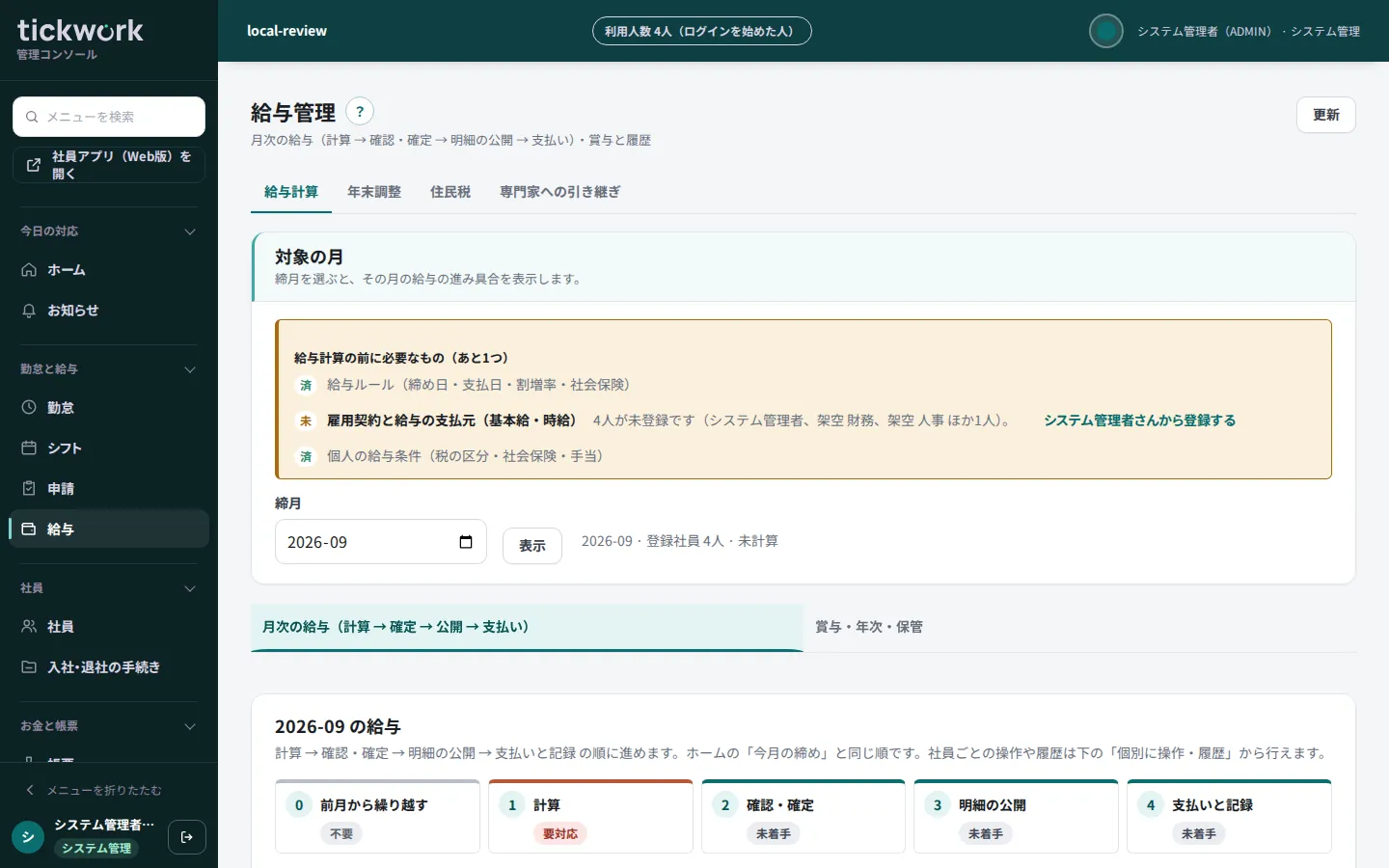
Payroll management in the admin console: cards for proceeding with the September 2026 payroll in the order “Calculate”, “Review” and “Publish payslips”, with calculation and review completed and payslip publication in progress

Note: Screens are for illustration purposes only (the data shown is fictional).

An employee in work clothes on a break-room bench, viewing a payslip that arrived on a smartphone
Payslips arrive directly on employees' smartphones.

From attendance totals to handover to professionals

Scroll to switch screens in sequence.

  1. 1 Attendance totals

    Mark attendance as "Confirmed" in bulk

    Employees not yet confirmed are excluded from bulk payroll calculation.

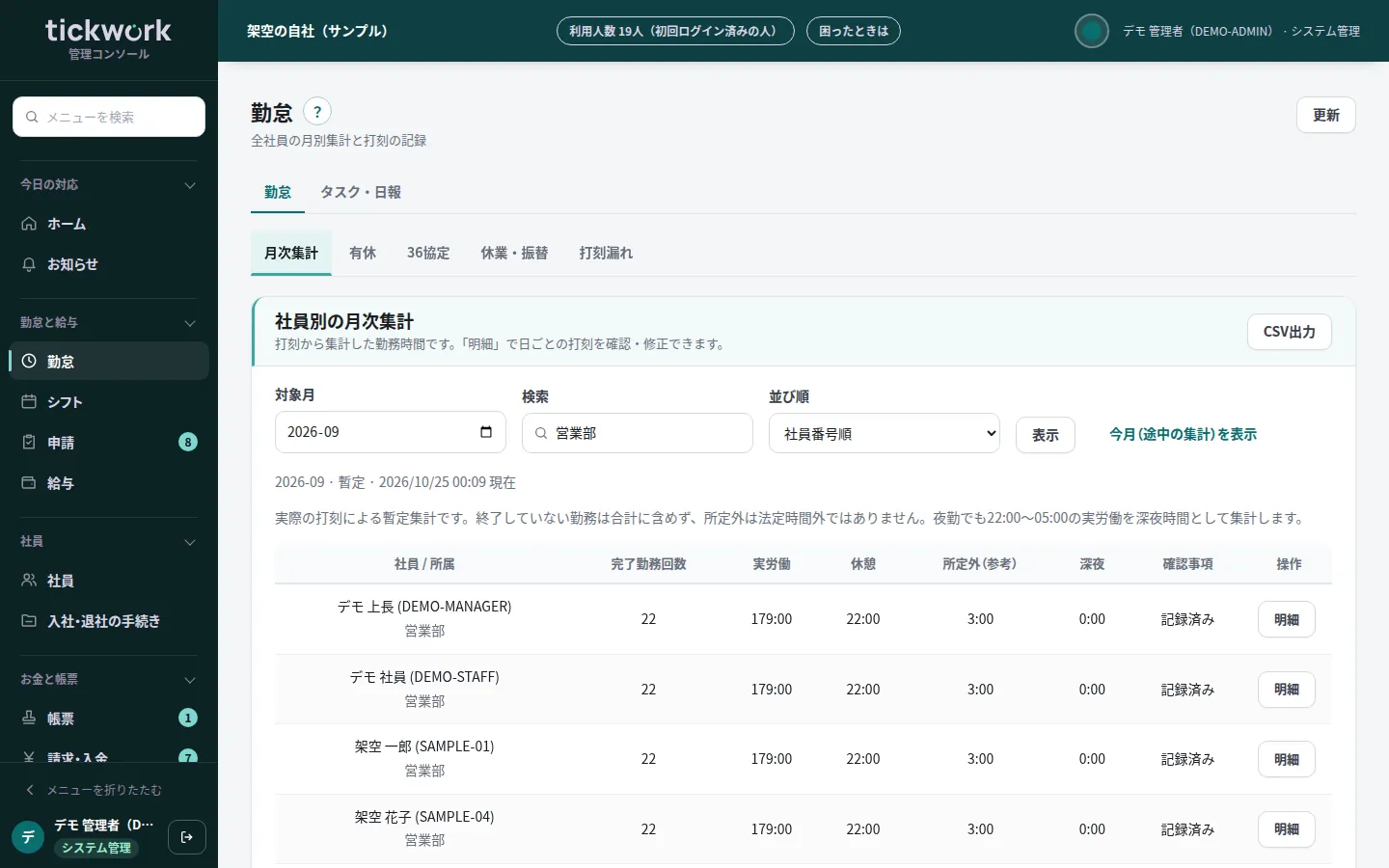
    Attendance list in the admin console, showing each employee's actual working hours, breaks, hours outside scheduled working hours, late-night hours and items to check
  2. 2 Payroll calculation

    Drafts calculated from attendance and contracts

    Carry over last month's details, checking hires, departures and leaves of absence.

    Payroll management in the admin console: cards for the steps of carrying over from the previous month, calculation, review and finalization
  3. 3 Review

    Review changes from last month before finalizing

    Lists employees whose net pay changed significantly.

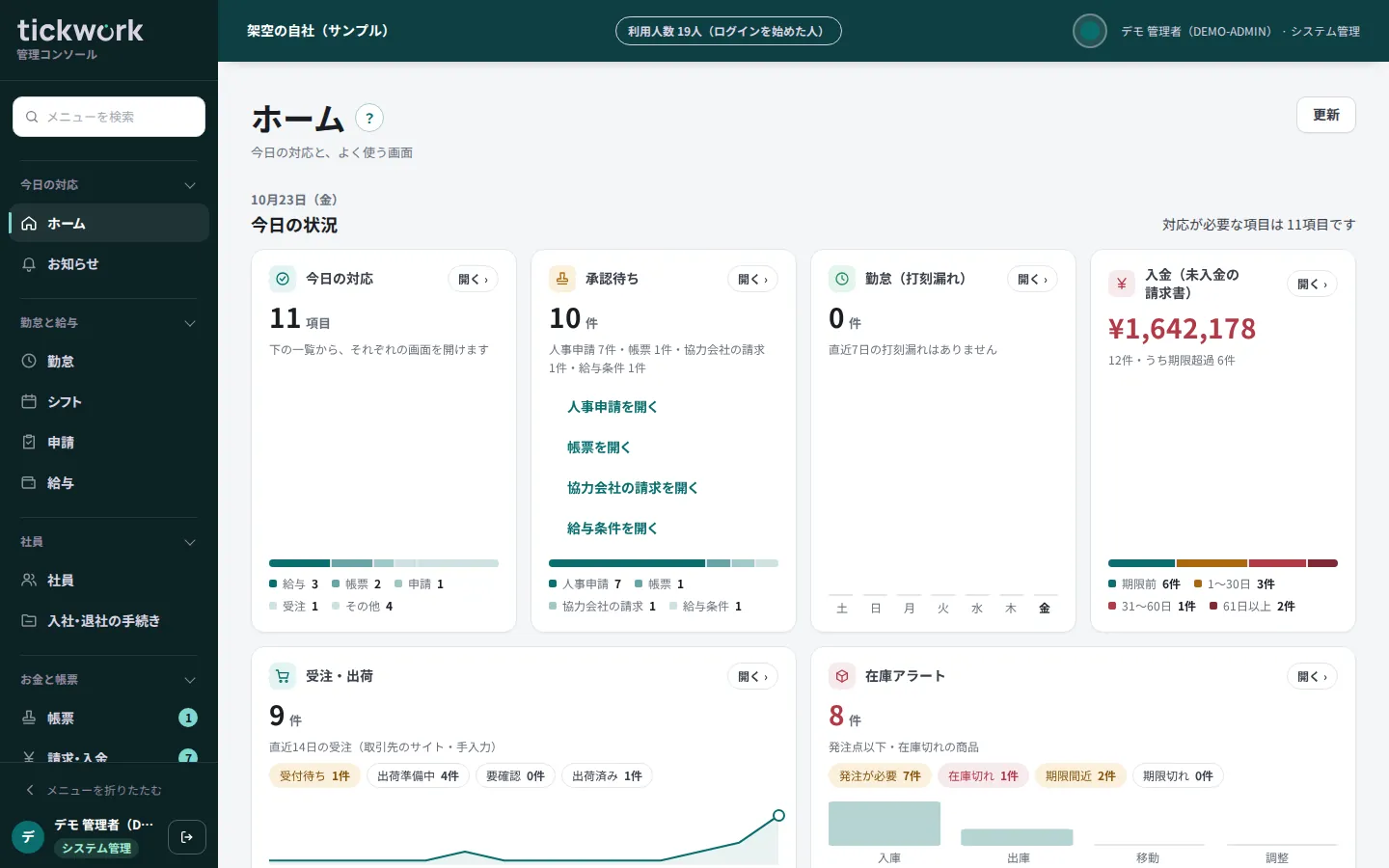
    Home screen of the admin console: Today's tasks listed with counts
  4. 4 Publish payslips

    Payslips delivered to employees' apps

    Records can also be kept for employees who receive paper payslips.

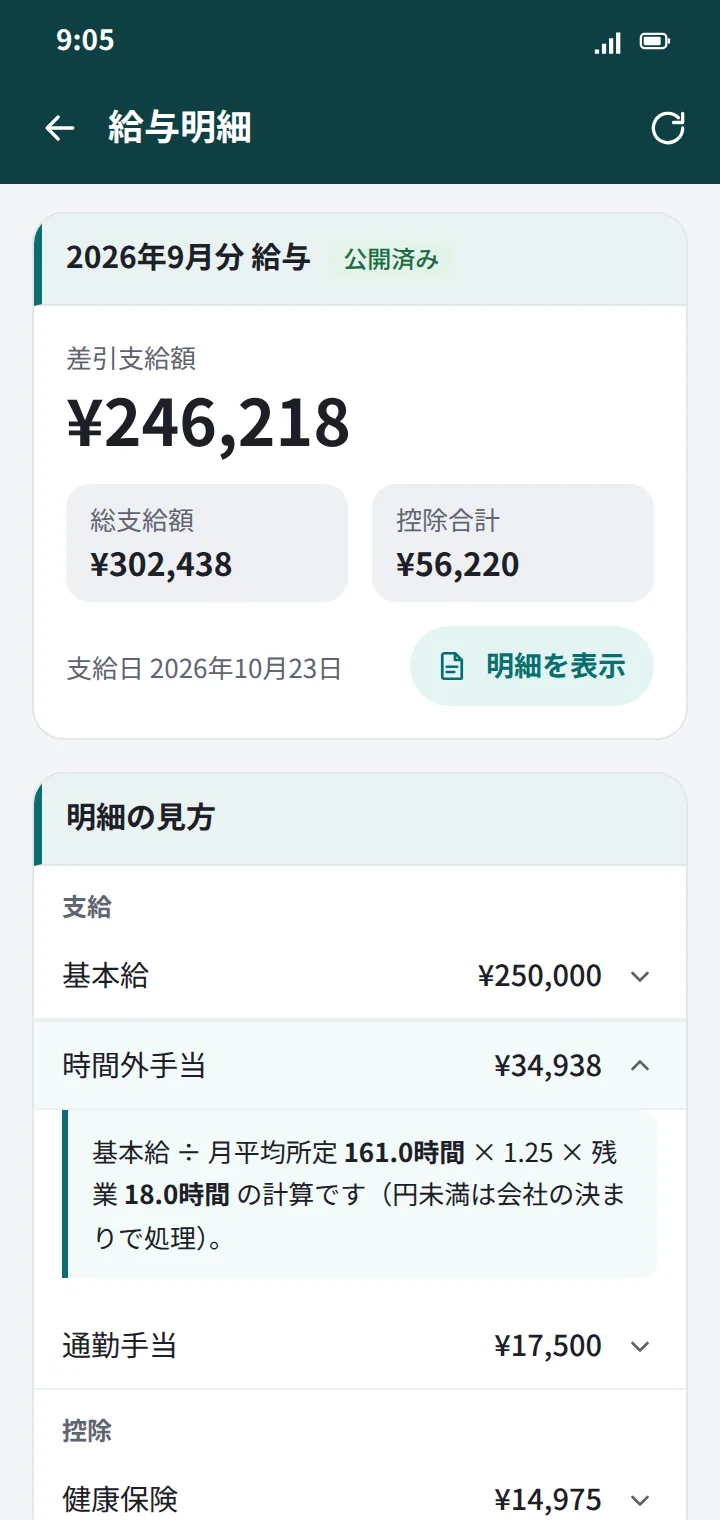
    Payslip in the employee app: net pay, gross pay and total deductions, with “How to read your payslip” open to show the basis for the overtime pay calculation
  5. 5 Handover to professionals

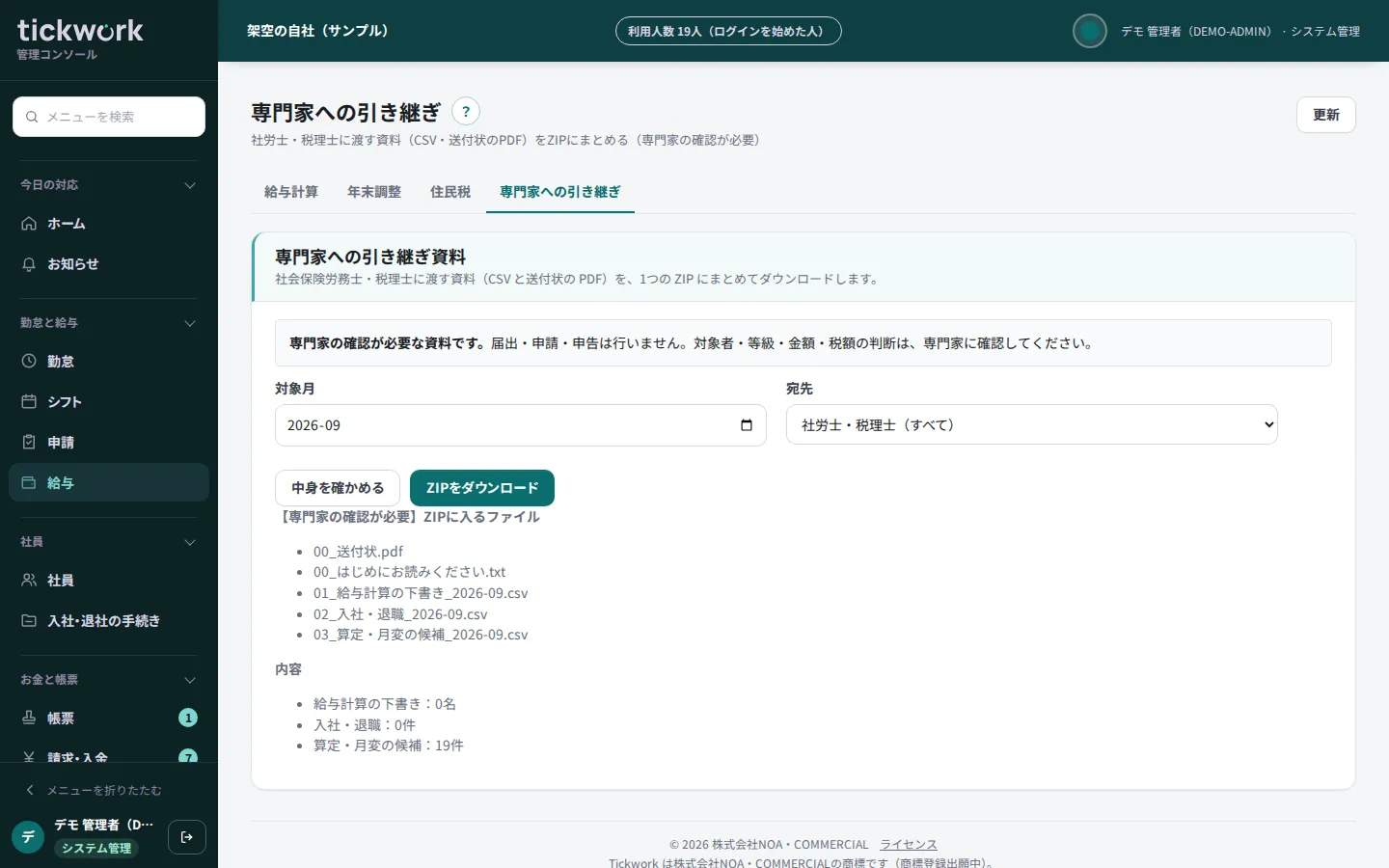
    Documents for labor consultants and tax accountants in a ZIP

    Every file states that professional review is required.

    Handover to professionals in the admin console: target month and recipient, and the files included (cover letter, payroll list, hires and departures, and candidates for the annual determination and occasional revision of standard monthly remuneration)

Note: Illustrative screen (fictional data).

How to read your payslip

Tap an item to see the source figures. Fewer questions about how amounts were determined.

  • Figures are shown from payroll settings and that month's attendance
  • Questions go to the person in charge from the app

September 2026 payroll

Published
Overtime pay ¥34,938

Calculated as base salary ÷ average monthly scheduled hours of 161.0 × 1.25 × 18.0 hours of overtime (fractions of a yen are handled according to company rules).

Note: Screen image (fictional amounts). Calculation methods and rounding depend on company settings.

Calculate, review and publish

Proceed in order: calculate → review → publish

Records who confirmed what and when, step by step.

  • Calculation of salaries and bonuses (including deductions for health insurance, long-term care insurance, employees' pension insurance and employment insurance premiums, withholding income tax and resident tax)
  • Review employees with large changes from last month before finalizing
  1. 1CalculateSaves drafts from attendance and employment contracts.
  2. 2ReviewReview changes from last month and supporting documents, then finalize the month.
  3. 3PublishSaves payslips and publishes them to employees.
Month-end closing

Month-end closing: just press from top to bottom

From around the 25th of each month, "This month's closing" appears on the home screen. Completed steps are detected automatically.

  1. Monthly attendance reviewMark as confirmed in bulk from the list.
  2. Carry over last monthAsks whether to start with the same pay recipients as last month, showing hires, departures and leaves of absence.
  3. Calculate and check against last monthReview employees with large changes.
  4. Finalize and publish payslipsPublishes payslips to employees' apps.
  5. Bank transfer dataCreates Zengin format (bulk transfer) files and CSVs for GMO Aozora Net Bank, SBI Sumishin Net Bank and Rakuten Bank.
  6. Payroll journal entries for accounting softwareCreates journal entry CSVs from finalized payroll.
Transfer data and journal entry detailsRegistering bank accounts, Japan Post Bank, account titles
  • Employees request their salary bank account in the app by selecting the bank and branch from a list. Japan Post Bank symbols and numbers are converted to transfer numbers automatically
  • Account titles for payroll journal entries are set by your company

Note: Bank transfer data only creates files to be imported into the bank; transfers themselves are not performed. Please check the transfer results on the bank's screen. Each bank's import format may change. Please check the latest specifications with each bank.

What employees receive

How to read payslips and year-end tax adjustment declarations, on smartphones

  • How to read your payslip

    Tap an item to show the source figures. Hourly employees also see an estimated annual income.

  • Electronic delivery of bonus statements

    Bonus statements in the app too. Employees choose whether to receive each bonus statement electronically.

  • Year-end tax adjustment declarations on smartphones

    Employees enter dependents, insurance premiums, housing loans and more, and attach certificates as photos.

  • Importing resident tax

    Import special collection tax amounts from municipalities in bulk by CSV.

Payslip, year-end tax adjustment and resident tax detailsEstimated annual income, declaration fields, tax changes
  • Example of how payslips explain amounts: overtime pay is shown as base salary ÷ average monthly scheduled hours × overtime hours × 1.25
  • The estimated annual income is shown only when needed, such as from September, comparing this year's pay and year-end projection with the ¥1,060,000, ¥1,300,000 and dependent thresholds
  • Entered for the year-end tax adjustment: dependent family members and spouse, estimated own income, deductions such as life and earthquake insurance premiums, housing loans (second year onward), and withholding tax certificates from previous employers. Dependent information is applied to payroll conditions after review by finance staff
  • Imports the annual resident tax amount and monthly amounts for June through the following May, and shows errors line by line. Differences for past months when the tax amount changes mid-year can also be recorded (they are not deducted from salary automatically)

Note: In the year-end tax adjustment, the person in charge reviews the declarations, then calculates the annual tax and any over- or underpayment and prepares withholding tax certificates (copies for employees).

Handover to professionals

Compile materials for certified social insurance and labor consultants and certified public tax accountants

Export everything as one package from Payroll → Handover to professionals (専門家への引き継ぎ).

  • Cover letter

    A PDF stating what is handed over and for which month.

  • Payroll list

    A list (CSV) of payments and deductions for the finalized month.

  • Hires, departures and revision candidates

    Lists employees who may need an annual determination (算定基礎) or occasional revision (月額変更) check. Grades and similar matters are not determined.

  • Year-end tax adjustment records

    Exports what employees declared in the app, from November to January.

Note: Filings and returns are not performed. When exported by HR staff, the materials exclude amounts.

Division of roles

Payroll calculation and payslip issuance;
filings and payments not included

Tickwork handles payroll calculation and the issuance of payslips. Calculation results are reviewed and finalized by the person in charge at your company. Social insurance and tax filings, electronic applications, and payment of taxes and insurance premiums should be handled by your company or by professionals such as certified social insurance and labor consultants and certified public tax accountants.

Tickwork

Calculation and issuance

  • Calculation of salaries, bonuses and year-end tax adjustment
  • Review and recording of documents
  • Issuance of payslips and creation of bank transfer data
Your company, certified social insurance and labor consultants, certified public tax accountants, etc.

Filings and payments

  • Review and finalization of calculation results
  • Social insurance and tax filings and electronic applications
  • Payment of taxes and insurance premiums

Please feel free to contact us

We will ask about your number of users and the features you need, and advise you on how to proceed with implementation.

  • Free 30-day trial
  • No card required

If you would like to review materials first, please request materials (we will send a PDF by email).

Free 30-day trial
Contact us
Try free for 30 days Contact us