This page is a translation of the Japanese page. Inquiries and support are handled in Japanese. The admin console is available in Japanese only; the employee app supports 日本語, English, Tiếng Việt, 中文(简体), 中文(繁體), 한국어 and नेपाली.

Migration, integrations and other features

Switching and management without the hassle

Employee management, migration and integrations are included in Single-module plan and Tickwork All-in-One fees.

From data migration to accounting, in five screens

Scroll to switch screens in sequence.

  1. Data migration

    Import CSV files from other services

    Import employees, business partners, products, stock, remaining paid leave and more.

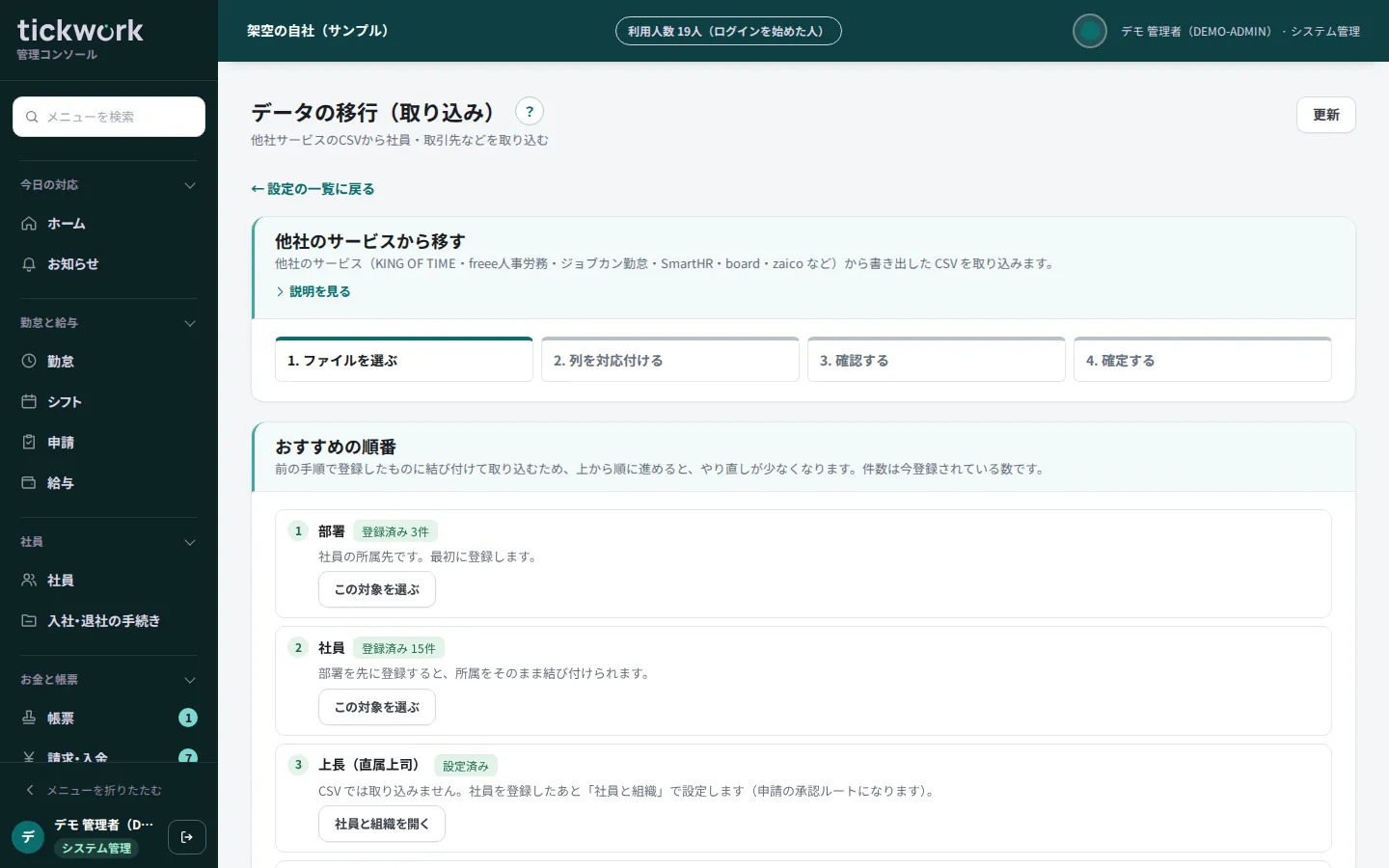
    Data migration in the admin console: the steps Select file, Map columns, Review and Finalize, and the recommended order (departments, employees, managers and remaining paid leave days)
  2. Industry-specific initial settings

    Start from initial settings close to your industry

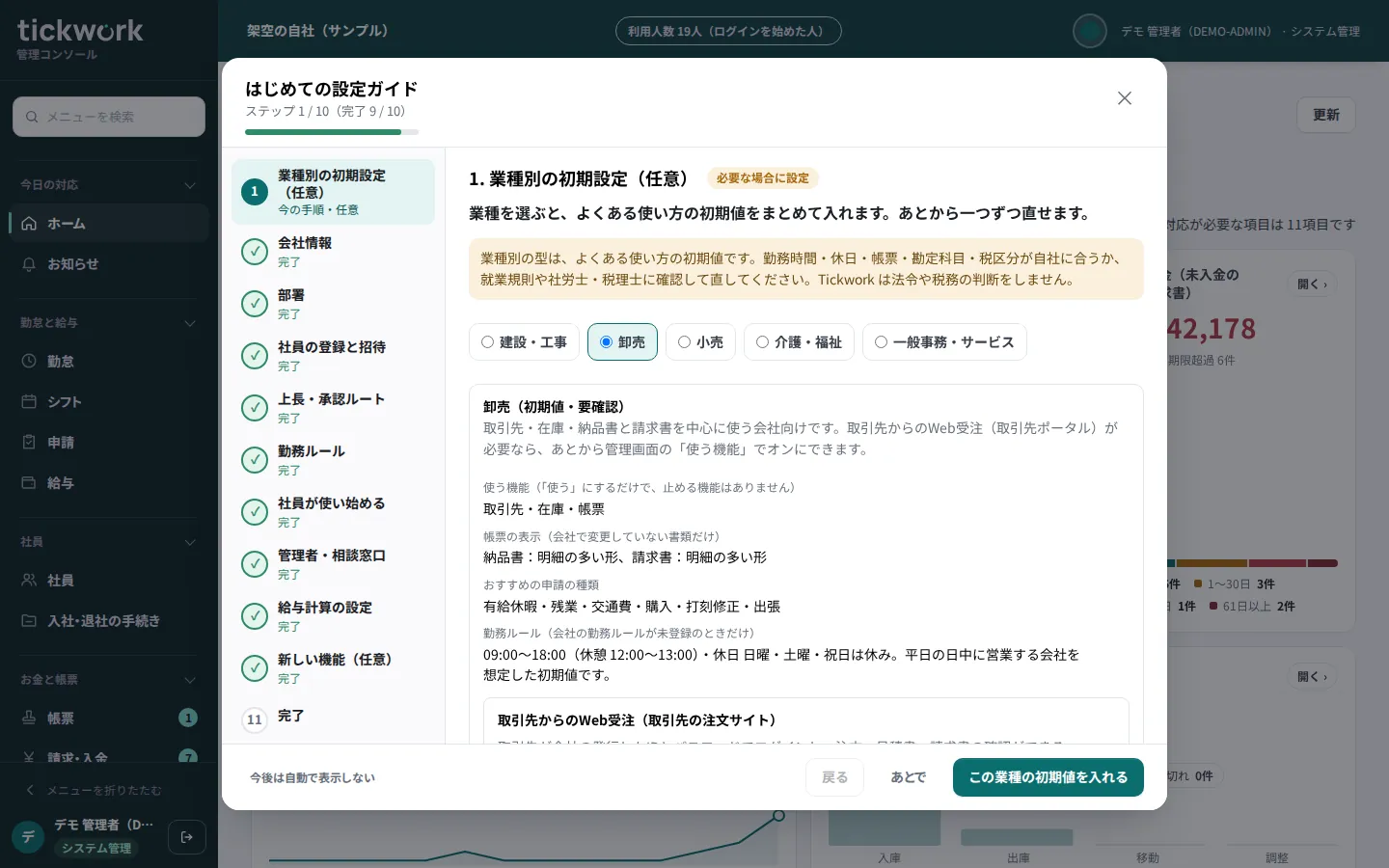
    Choosing an industry fills in default values for features, business documents and work rules. You can change them later.

    Industry-specific initial settings in the Getting started guide: industry options, and default values for features in use, business document display, recommended request types and work rules
  3. Locations

    Head office, branch offices and warehouses as locations

    Location managers can review only employees at their own location.

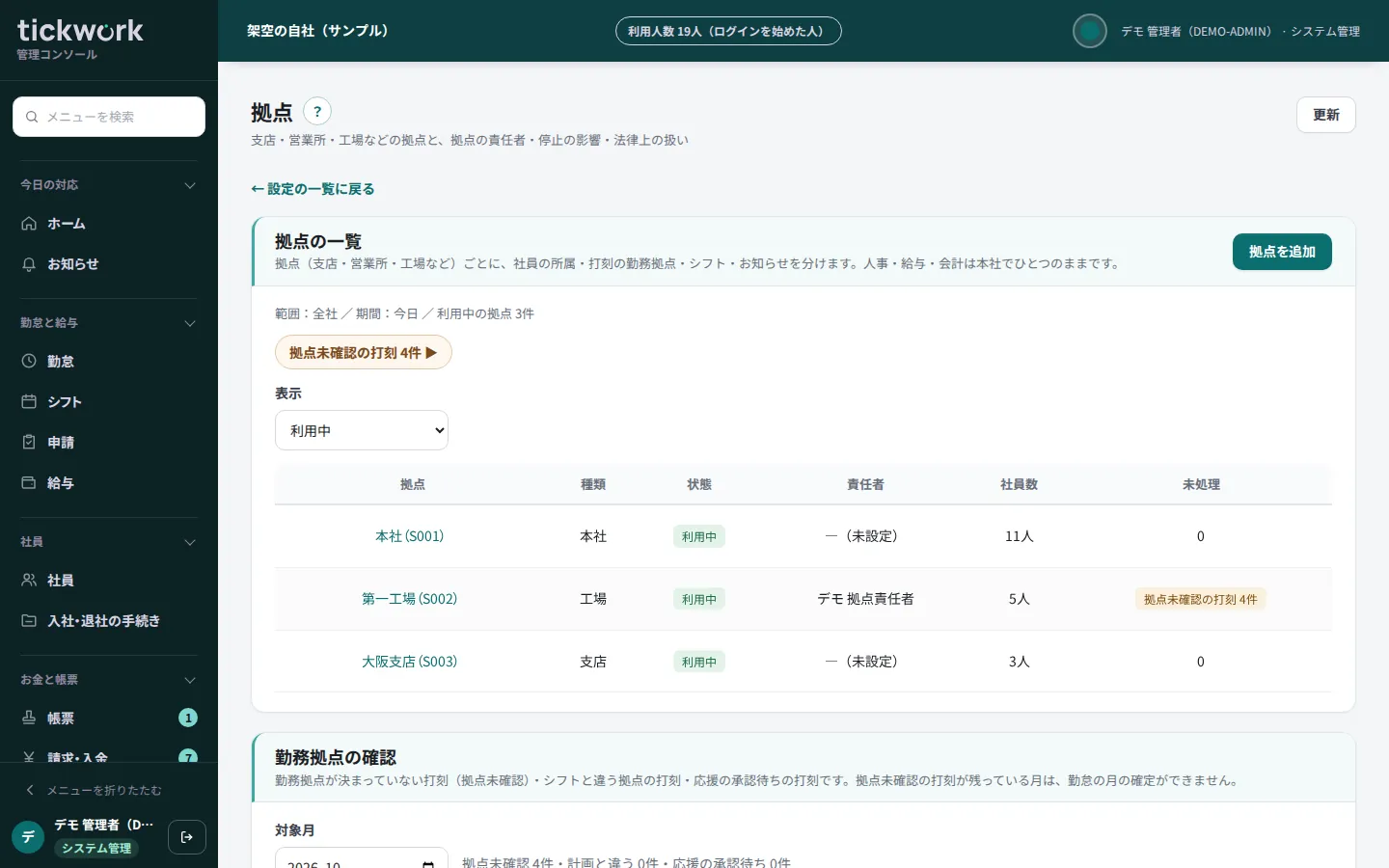
    Locations in the admin console: a list of locations (type, status, manager, number of employees and pending items)
  4. Admin console home

    Open it and see what to do today

    Lists pending approvals, overdue invoices and more, with counts.

    Home screen of the admin console: Today's tasks listed with counts
  5. CSV for accounting software

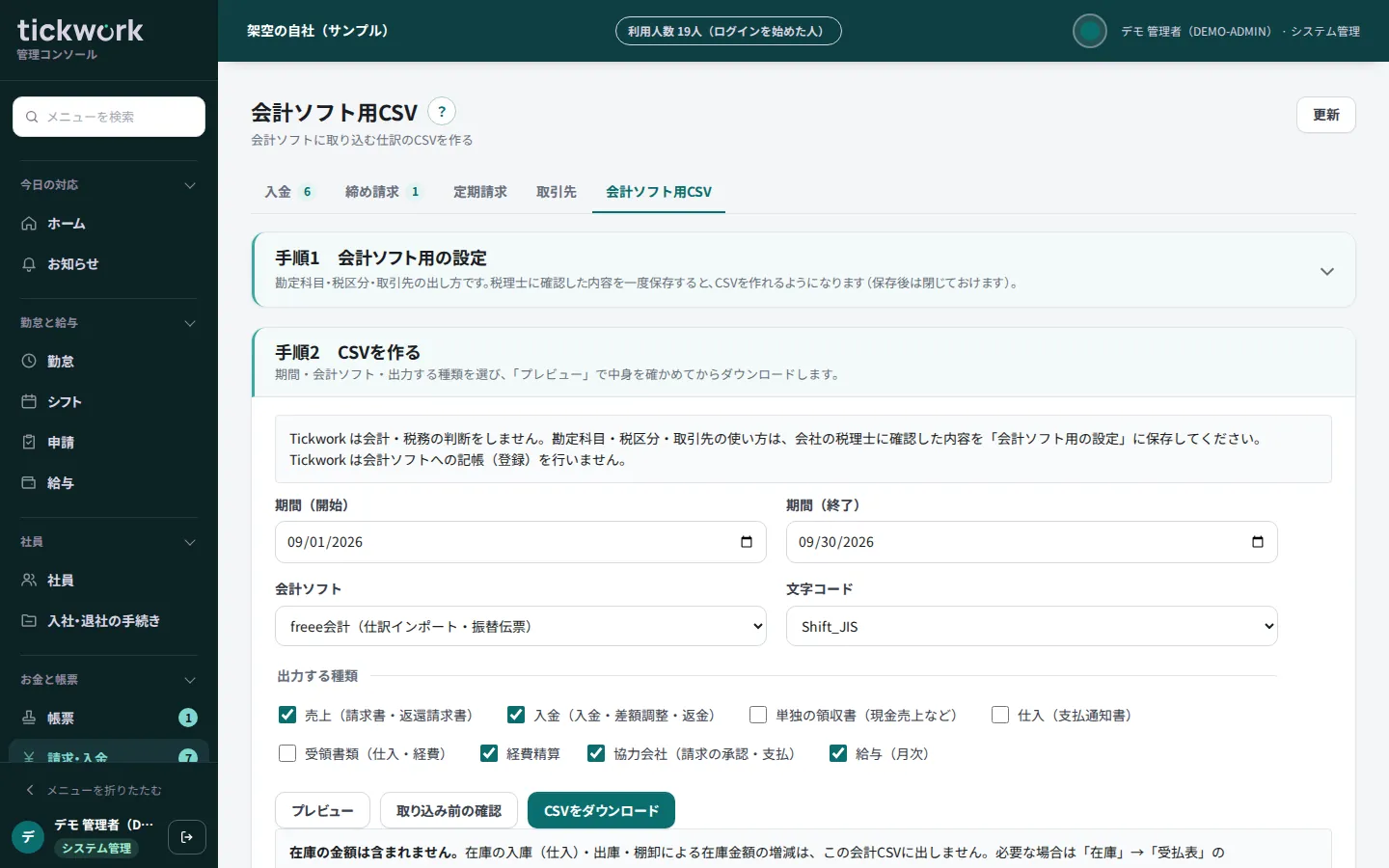
    Journal entry CSVs for accounting software

    After the month is finalized, only changes can be exported.

    CSV for accounting software in the admin console: select the period, accounting software, character encoding and data types, then preview

Note: Screen image (fictional data). Industry-specific initial settings are default values. Please confirm at your company whether working hours, business documents, account titles and so on suit your business. Company names are trademarks or registered trademarks of their respective companies.

Import in four steps

Nothing is registered until you press "Finalize" (確定する). Try going through the steps.

  • The recommended order is departments → employees → remaining paid leave days → business partners → products
  • The reason is displayed for rows with errors, and only correct rows are registered

Data migration: employees

  1. File
  2. Column mapping
  3. Review
  4. Finalize
Select file

employees_202610.csv (42 rows) was selected. The character encoding was detected as Shift_JIS.

Note: Screen image (fictional files and counts).

Admin console home

Open it and see what to do today

Lists items needing action across features, with counts.

  • Today's tasks: pending approvals, overdue invoices, residence period checks and more
  • This month's closing: automatically checks completion from attendance to CSV for accounting software
  • My work (わたしの仕事) shows your tasks and pending approvals in order of deadline
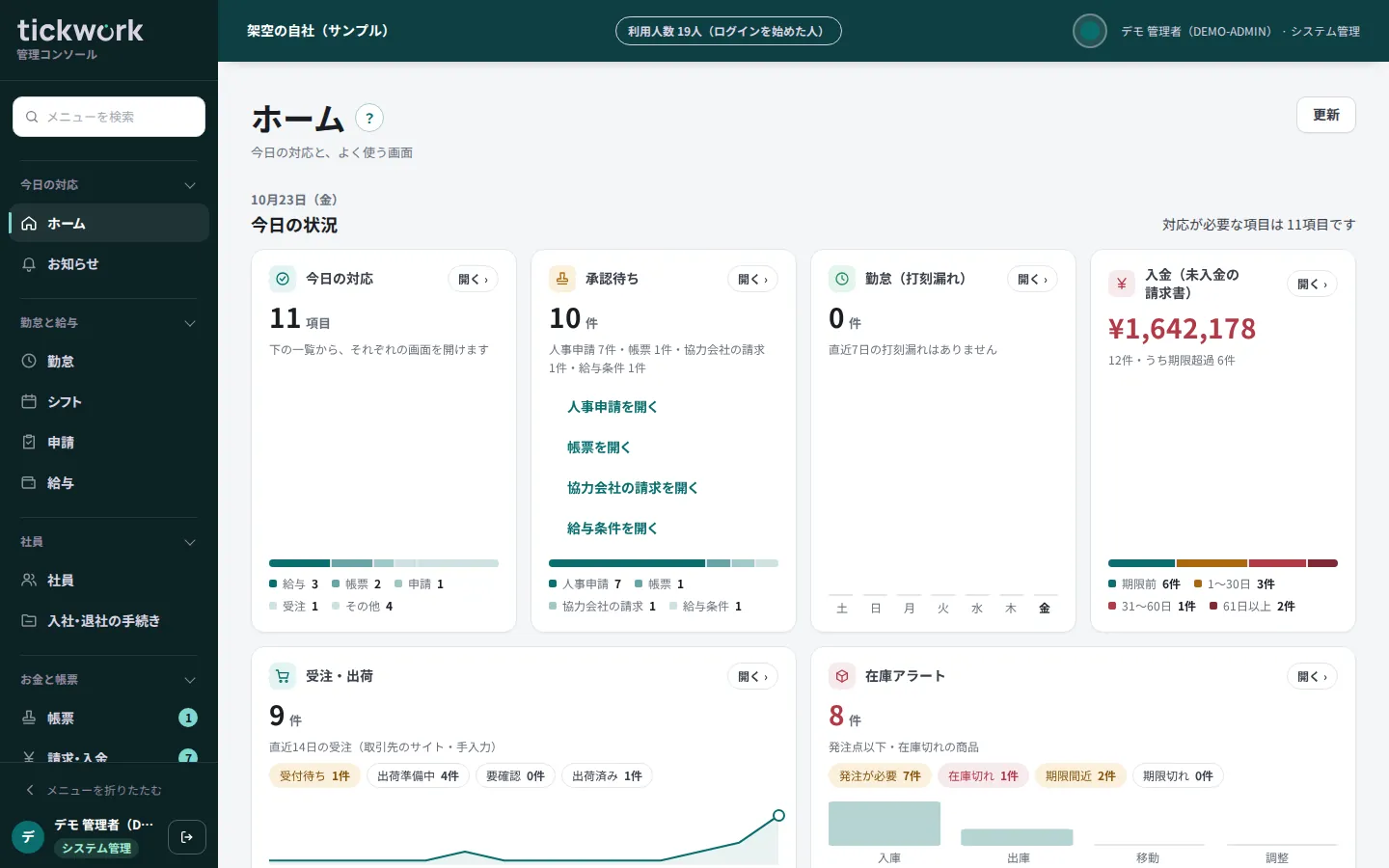
Home screen of the admin console: Today's tasks shows, in a single list with counts, the days until payroll finalization, overdue invoices, products that need reordering, unsettled expenses and more; below it, This month's closing (September 2026) starts with the monthly attendance review

Note: Screens are for illustration purposes only (the data shown is fictional).

From hiring to departure, in the admin console

  • Onboarding procedures, all at once

    Register employee (社員を登録) has three steps and ends with guidance on initial app setup.

  • Bulk employee registration by CSV

    Rows with errors are shown in red, and only valid rows are registered.

  • Role templates

    Set up access just by choosing a feature set such as "Sales" or "Warehouse".

  • Processing departures

    Review pending approvals, assigned projects and staff, specify successors and suspend the account.

  • "Action needed" for each employee

    Shows missed clock-ins and unread required documents, and notifies the employee with Remind (催促).

  • Change history

    Records changes to affiliation, role and permissions, with before and after values and who changed them and when.

  • Getting started guide

    Set up in nine steps. If you close midway, you can resume where you left off.

  • Notice of working conditions

    Creates a combined Notice of working conditions and employment contract PDF from the employment contract.

  • Standard monthly remuneration records and materials

    Used as a guide for payroll calculation, and documents for your certified social insurance and labor consultant can be created (filings are not made).

Employee management detailsHandover on leaving, department names, passwords
  • Staff and projects are handed over the day after the departure date. Changes to department, position and direct manager can be scheduled for a set date with Scheduled transfer (異動の予約)
  • Department names can be changed later, and previous names remain in records
  • Passwords must be at least 8 characters, including both letters and numbers. If forgotten, check how to reset from Forgot your password (パスワードを忘れた場合) on the login screen
  • Set the groups to join, documents to read and whether a clock-in card is needed by department and role, and set up hires and departures in bulk

Get started in a way that fits your company

Each can be turned on or off under Features in use (使う機能) in the admin console.

  • Locations (multiple sites)

    Set up head offices, branches, warehouses and more as locations. The clock-in location is recorded, and announcements can be sent by location.

  • Company domain email

    Send and receive email with company addresses in the app and the web version. For details, see Company email.

  • Industry-specific initial settings

    Choose construction, wholesale, retail, nursing care or general office to fill in default values. You can change them freely later.

Location, email and initial setup detailsLocation managers, supported email, checking default values
  • Location managers can review work schedules and clock-ins of employees at their own location (only that location's employees are shown). Monthly attendance is finalized by HR at the head office
  • Email connects to mailboxes on your contracted mail server. Free email services and mobile carrier email are not supported. Employees cannot change signatures
  • Industry-specific initial settings are default values. Review them before you start. Project features by industry can be added with industry feature packs
Locations in the admin console: a list of locations (head office, Plant No. 1 and Osaka branch, with type, status, manager, number of employees and pending items), and review of work locations
Locations in the admin consoleManager and employee count by location (illustrative screen, fictional data)

Easy to migrate, easy to try

  • Import current data by CSV

    Import CSVs exported from other services in the admin console.

    • Employees, departments, remaining paid leave days, business partners, products (including opening stock), projects and schedule events
    • Import accounts receivable and payable from your previous system as balances at migration (also included in cash flow forecasts)
    • Detects character encoding (UTF-8, Shift_JIS) automatically
  • Try it with sample data

    Starts with fictional employees, requests, business documents and more.

    • Sample employees cannot log in and are not counted as billable users
    • Delete at any time from the admin console (data registered by your company remains)
    • The standard trial period is 30 days, free of charge
  • The employee app in seven languages

    Employees can choose from 日本語, English, Tiếng Việt, 中文(简体), 中文(繁體), 한국어 and नेपाली.

    • The default is Japanese. Switch from Settings in the app or on the login screen
    • The admin console, legal wording and entered content remain in Japanese

Note: Hire dates, phonetic readings of names and employee email addresses are not imported. The number of paid leave days granted and their expiry dates are not calculated automatically. Company names are trademarks or registered trademarks of their respective companies.

HR and accounting: collecting and totaling documents, made easy

  • Schedules and tasks

    Meeting rooms and equipment can also be booked (overlapping bookings are not accepted). Tasks can be assigned to others.

  • Onboarding and offboarding procedure materials

    Collects information such as addresses and bank accounts and documents from employees, and compiles them into a package (ZIP) for your certified social insurance and labor consultant.

  • Business partner interaction history

    Record visits, calls, emails and other interactions in the app and share them with users of the business partner feature.

  • Business partner details

    Review transaction history, annual sales and contract records by business partner.

  • Project profit and loss

    Compares budget with actuals from business documents and expense claims. Gross profit is a management estimate, not accounting profit.

  • Certificate requests

    Request certificates of employment and certificates of employment history after leaving from the app. Issuance history is kept.

  • Expense reimbursement

    Request out-of-pocket expenses with receipt photos; after approval, they are compiled into CSV for accounting software.

  • Internal consultation desk

    Sends harassment consultations and customer harassment records to the consultation desk.

  • Chat with external people

    Invite business partner contacts and others to groups. They are not counted as billable users.

  • Project management

    Share tasks, assignees and deadlines on a schedule, and exchange photos, reports and chat with partner companies.

Details for eachProcedure documents, business partners, expenses, consultation desk, external users
  • Procedure documents: My Number is not collected, and procedures and electronic applications are not handled. For Japan Post Bank, passbook symbols and numbers are converted to the branch name and account number for transfers automatically
  • Business partner transaction history shows only the types each user is authorized to view. Contract records can hold master agreements, anti-social forces checks and NDAs
  • Each company chooses whether final expense approval ends with the manager or goes to finance after the manager
  • Pressing "Call for backup" at the consultation desk immediately notifies the person in charge and the direct manager (the manager does not see the details)
  • External people can view only the groups they are invited to. Available only if enabled by the company (disabled by default)

Integration with your systems

  • External API

    Read and write inventory, and read approved business documents and business partners.

    • Set the permitted scope, source IP addresses and expiry date for each API key
    • Specifications for integration are published
  • E-commerce integration (Shopify)

    Sends stock quantities to your Shopify store automatically.

    • Import paid orders as stock out (optional)
    • Products are matched by SKU and JAN
  • CSV for accounting software

    Creates journal entry CSVs that can be imported into freee Accounting, Money Forward Cloud Accounting and Yayoi Kaikei (弥生会計).

    • From invoices, payments, payment notices, expense claims, payroll, partner company invoices and the cash book
    • Account titles and tax categories follow your company's settings (please confirm with your certified public tax accountant)
    • Importing into accounting software is performed by your company

Note: Integration with Shopify requires setup by an administrator of your Shopify store. Shopify, freee, Money Forward and Yayoi are trademarks or registered trademarks of their respective companies.

Please feel free to contact us

We will ask about your number of users and the features you need, and advise you on how to proceed with implementation.

  • Free 30-day trial
  • No card required

If you would like to review materials first, please request materials (we will send a PDF by email).

Free 30-day trial
Contact us
Try free for 30 days Contact us